You can make a Home Affairs booking online through the department’s Branch Appointment Booking System (BABS), which has moved to the MyHomeAffairsOnline platform. Bookings are for Smart ID and passport services. You need a valid South African ID number and a cellphone number, and then you choose your province, town, office and time slot. Walk-ins are still served, and bank branches offering Home Affairs services do not need bookings.
Try this tool before you read on
Appointment Booking Helper
Book, change or cancel.
What Can You Book at Home Affairs?
The booking system covers two services only:
- Smart ID card applications and collections
- Passport applications
Other services, such as death registration or applying for a full (unabridged) birth certificate, do not need a booking, according to the department’s booking notice. You go to the office during opening hours.
Do You Need a Booking at All?
Often you don’t. Before you book, check which channel suits you:
| Your situation | Booking needed? |
|---|---|
| Smart ID or passport at a Home Affairs office that uses BABS | Recommended. Walk-ins are still served, but a booking can save time |
| Smart ID replacement or switching from a green ID book at a participating bank | No. The bank service is walk-in |
| Adult passport (18 and older) at a participating bank | No. The bank service is walk-in |
| Applied online on eHomeAffairs | Yes, you book a slot at a bank or office to give your biometrics |
| Death registration or full birth certificate | No |
| Visa or permit application through VFS Global | A separate VFS appointment is required. See our Home Affairs visa application |
What You Need Before You Book
- A valid South African ID number. The system only accepts valid RSA ID numbers, so foreign nationals cannot use it.
- Your full name and surname as they appear on your ID.
- A cellphone number for your confirmation and reminder.
- An email address (optional).
- An idea of which office you want to use. Not every Home Affairs office uses the booking system. Our Home Affairs branch locator explains how to find one.
How to Book a Home Affairs Appointment Online
- Open the booking system. Go to Home Affairs MyHomeAffairsOnline. The old address at services.dha.gov.za now shows a notice that the booking system has moved there.
- Enter your South African ID number.
- Enter your personal details: full names, surname, cellphone number and, if you want, an email address.
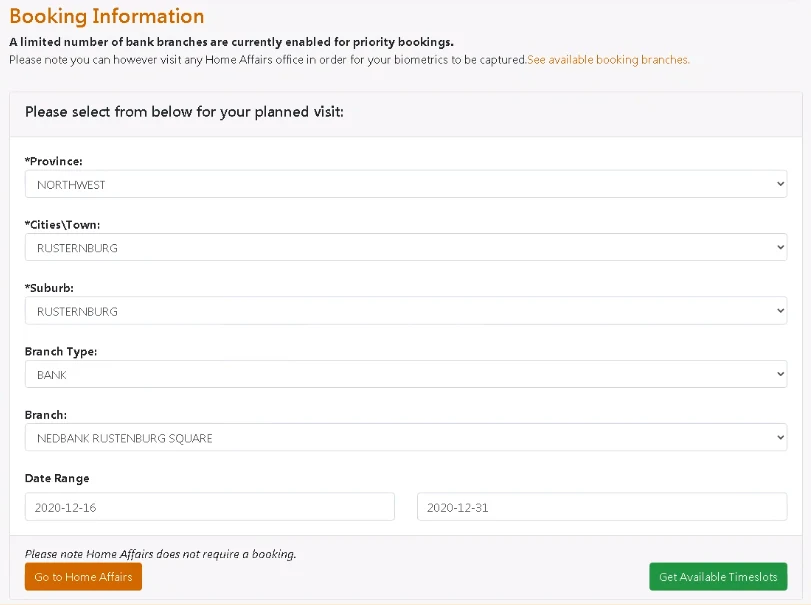
- Choose your location: select your province, then your city or town, then the branch.
- Pick a date and time slot from the available options.
- Confirm the booking. You receive a confirmation, and the system sends a reminder by SMS or email three days before your appointment.
Keep your confirmation message. You may be asked to show it when you arrive.
If you applied on eHomeAffairs
If you completed and paid for your Smart ID or passport application on Home Affairs eHomeAffairs, you book a slot as the last step, at a Home Affairs office or a bank branch that is enabled for the service. Take your printed barcoded confirmation letter to the appointment.
How to Reschedule or Cancel a Home Affairs Booking
You can change or cancel a booking once you have received the booking confirmation:
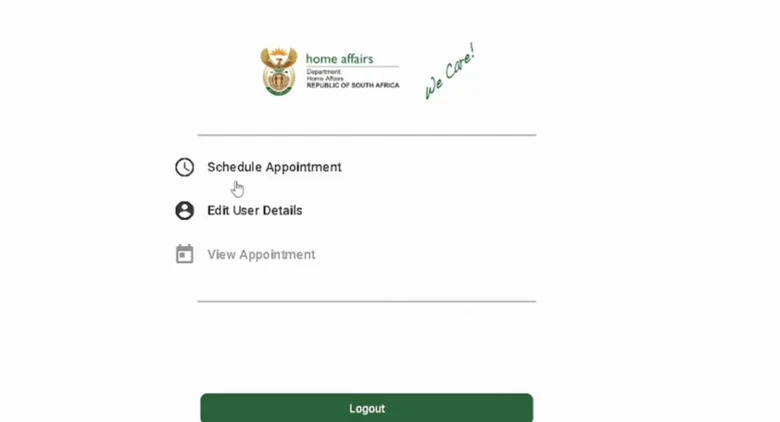
- Log back into the booking system with your ID number.
- Open your existing booking.
- Choose to cancel it, or pick a new available date and time.
A few rules to keep in mind:
- Bookings are personal and not transferable. You cannot give your slot to someone else.
- One booking covers one applicant. Each person in the family needs their own booking.
- If the office is closed or offline on your day, the system lets you select another date.
What to Take to Your Appointment
- Your current ID (green ID book or Smart ID card), or your birth certificate if this is your first ID
- Your booking confirmation
- Your eHomeAffairs confirmation letter, if you applied online
- Any supporting documents for your application (see the Home Affairs Smart ID or Home Affairs passport application guide)
- Money for the fee, if you did not pay online
Arrive a little before your slot. If you miss it, you will usually need to rebook or join the walk-in queue.
Common Booking Problems
No slots are available
Popular offices fill up quickly. Try a nearby office, check again later, or consider a participating bank branch if your service is available there. Bank branches serve walk-in customers.
Your office is not on the list
Only some Home Affairs offices use the booking system. If yours is not listed, it serves clients on a walk-in basis.
The system will not accept your ID number
The booking system only works with a valid South African ID number. If you are certain your number is correct and it still fails, call the Home Affairs Contact Centre on 0800 60 11 90.
You did not get a confirmation
Check that you entered the right cellphone number. If you still have nothing, log back in to see whether the booking exists before you book again.
Frequently Asked Questions
Is Home Affairs booking free?
Yes. Booking a slot does not cost anything. You only pay the normal fee for the service, such as R140 for a Smart ID re-issue. Be wary of anyone who charges you to “secure” a slot.
Can I book a Home Affairs appointment for my child?
The booking system asks for a valid South African ID number, so the person being booked needs one. For children’s passports, check the requirements in our Home Affairs passport application and contact the office if you are unsure how to book.
Can I go to Home Affairs without an appointment?
Yes. Offices still serve walk-in clients, although people with bookings may be helped first at offices that use the system.
Do I need a booking for a Smart ID at a bank?
No. Participating Absa, Capitec, FNB and Standard Bank branches offer Smart ID replacements without a booking. If you applied on eHomeAffairs first, follow the booking step shown there.
How far ahead can I book?
The department has not published a fixed booking window. The system shows the dates currently available for your chosen office.
What happens if I miss my appointment?
Your slot is not held. Book a new slot or go in as a walk-in.